

Lead Capture for Ecommerce
Lead capture is the process of collecting contact information from website visitors, such as an email address or phone number, so a brand can identify and communicate with them after they leave the site.
Most visitors who land on your website will leave without ever making a purchase. If you don’t have their information, they remain anonymous, which makes it harder to continue the relationship after they leave.
For ecommerce brands, lead capture is one of the best ways to turn anonymous website traffic into reachable, consent-based contacts. Lead capture usually happens through on-site forms, popups, quizzes, product alerts, account prompts, or other opt-in experiences.
But successful lead capture depends on more than adding a form to a website. To build an effective strategy that drives more value from existing traffic, brands need to understand why shoppers opt in, what information they are willing to share, and how to make the experience feel useful instead of disrupted.
This guide focuses on the on-site side of lead capture: how ecommerce brands collect contact information, reduce form friction, create a compelling value exchange, and measure opt-in performance.
You’ll learn how ecommerce lead capture works, why it matters, and how to build lead capture strategies that create more opportunities to identify, understand, and reconnect with shoppers.
For follow-up strategies post lead capture, see our dedicated guide on Email & SMS Remarketing.
TL;DR
- Lead capture helps ecommerce brands turn anonymous website visitors into identifiable shoppers they can reconnect with after they leave the site.
- Most shoppers do not convert during their first visit. Lead capture helps brands preserve shopper interest by collecting consent-based contact information before that interest disappears.
- Effective lead capture depends on understanding shopper intent. Timing, placement, format, and value exchange all influence whether an experience feels helpful or disruptive.
- Lead capture strategies need to adapt to different stages of the customer journey. A homepage welcome experience should not be approached the same way as a product alert, quiz, account signup, or high-intent opt-in.
- While lead capture is a list-building tactic, it also helps brands grow first-party data, improve opt-in quality, learn more about shopper preferences, and create a stronger foundation for future customer relationships.
What Is Lead Capture in Ecommerce?
In ecommerce, lead capture is the process of collecting consent-based information from website visitors so they can become identifiable shoppers instead of anonymous traffic.
This information often includes an email address or phone number, but it can also include product preferences, shopping interests, or other details a shopper chooses to share.
Lead capture usually happens through onsite forms, popups, quizzes, product alerts, account prompts, referral offers, or other opt-in experiences.
These experiences give shoppers a reason to share their information while they are actively browsing, comparing products, checking availability, or deciding whether to take the next step.
The purpose of lead capture is not just to collect more contacts. It is to create a clear and useful exchange between the shopper and the brand.
The shopper receives something relevant, such as an offer, product update, guide, or account benefit, while the brand gains permission-based information that can help continue the relationship beyond a single site visit.
Lead capture also helps connect traffic acquisition to customer engagement. Brands spend time and budget driving visitors to their sites through channels like paid advertising, search, social media, and affiliates.
Lead generation brings those visitors to the website, while lead capture gives brands a way to identify and stay connected with interested shoppers once they arrive.
What Is The Difference Between Lead Capture And Lead Generation?
Lead generation focuses on driving traffic and bringing users to a website, while lead capture focuses on converting those users into identifiable contacts that can be re-engaged later through owned marketing channels.
Put simply: lead generation brings visitors to your site. Lead capture identifies them once they arrive.
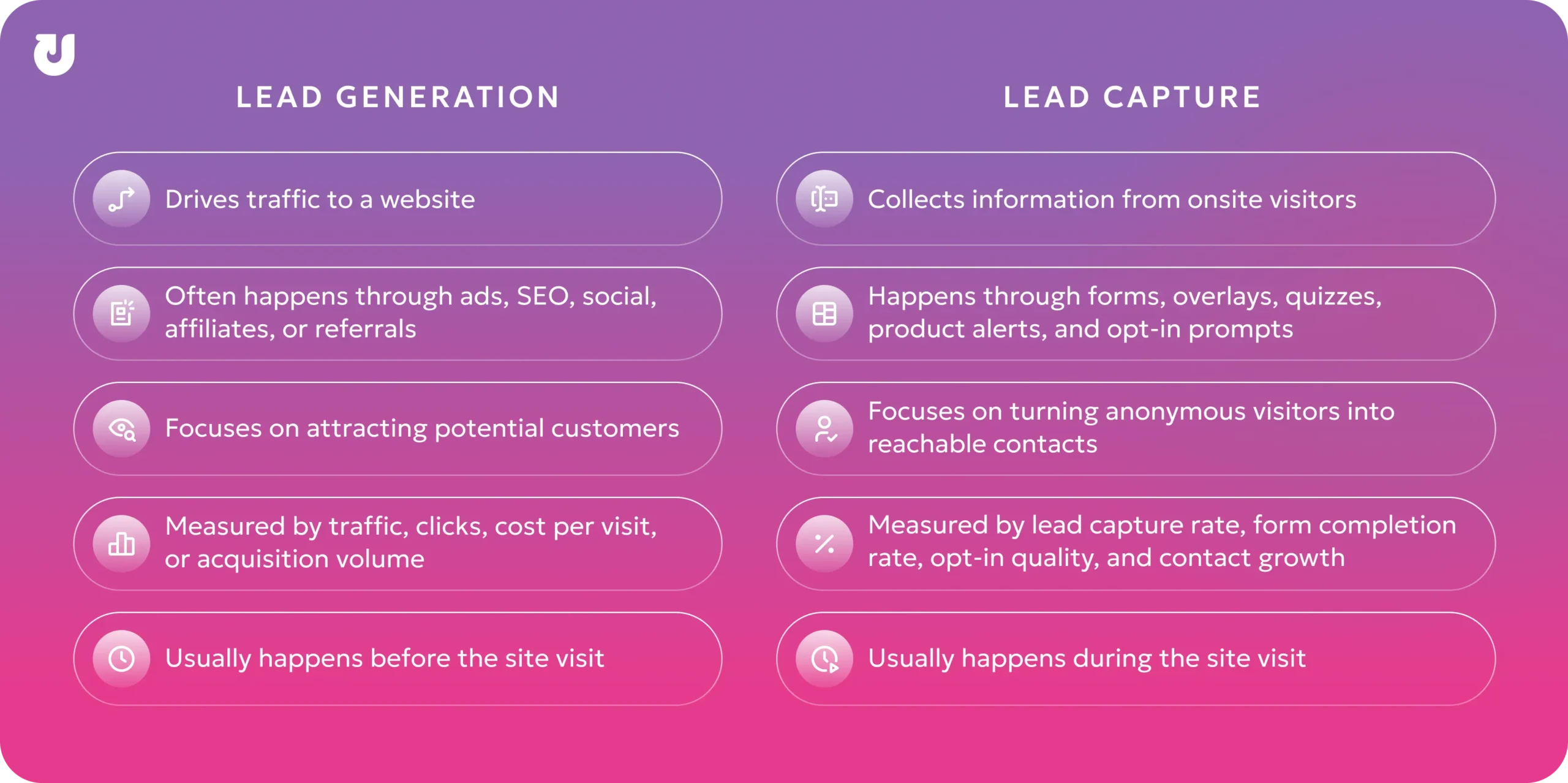
Both lead capture and lead generation play an important role in ecommerce, but they solve specific problems at different stages of the customer journey.
Why Lead Capture Matters
Lead capture matters because most ecommerce visitors do not purchase during their first site visit. According to Shopify, the average ecommerce conversion rate typically falls between 2% and 3%, meaning the majority of traffic leaves without converting.
When visitors land on a site, they are often researching products, comparing prices, or waiting for the right time to buy. Even when they are interested, they may not be ready to make a decision during that session.
Lead capture allows brands to preserve that interest by giving shoppers a clear reason to share their information before they leave.
This has a direct impact on several important metrics:
- Grow first-party data: Lead capture helps brands collect consent-based information directly from shoppers instead of relying only on third-party tracking or paid retargeting.
- Build owned audiences: Captured emails and phone numbers give brands a direct way to communicate with interested shoppers through channels they control.
- Improve shopper understanding: Preference-based capture, quizzes, and product alerts can reveal what shoppers care about, which products they are considering, and what kind of experience they expect.
- Increase the value of existing traffic: Lead capture helps brands create more value from visitors they have already paid to acquire through SEO, paid media, social, affiliates, or other channels.
- Support long-term customer relationships: Once a shopper opts in, brands have a foundation for future communication, loyalty, education, and customer engagement.
As privacy regulations evolve and third-party tracking becomes less reliable, ecommerce brands are placing greater focus on building direct relationships with shoppers through consent-based data collection and owned marketing channels.
Why Most Website Visitors Don’t Convert Right Away
Most visitors are not ready to make a decision the moment they land on a website because the shopping journey is often non-linear. This is especially true for products that have a higher price-point, have multiple options, or require longer consideration periods.
Unless a shopper is ready to purchase immediately, they’re going to spend time researching products, reading reviews, and evaluating pricing before deciding what to do next.
In many cases, leaving the site doesn’t signal a lack of interest. It’s just part of the decision-making process.
There are several common reasons why shoppers don’t convert right away:
- Timing: Some shoppers are waiting for the right moment to buy, such as an upcoming payday, seasonal sale, or a special occasion.
- Friction: Uncertainty around pricing, shipping costs, product fit, sizing, ingredients, return policies, or overall value can delay decision-making.
- Distraction: Shoppers can get interrupted by texts, emails, work, social media, or competing priorities before completing a purchase.
- Exploration: Many visitors compare products, brands, or retailers across multiple tabs and devices before making a final decision.
Even when visitors leave without converting, their behavior often reveals strong signs of interest or hesitation.
Actions like viewing multiple products, returning to the same pages repeatedly, interacting with product variations, starting a quiz, checking availability, or engaging with size and fit information can all signal that a shopper is actively considering a purchase.
These behaviors help brands better understand where shoppers may be in the decision-making process. In many cases, a non-converting visit is not a sign that a shopper lost interest entirely. It simply means they were not ready to take action yet.
Lead capture gives brands a way to respond to shopper interest while the shopper is still onsite. Instead of letting every non-converting visitor remain anonymous, lead capture creates an opportunity to collect contact information, preferences, or product interest before the session ends.
How Lead Capture Works
Lead capture works by identifying moments where shoppers show interest, hesitation, or intent, and then presenting an opportunity for them to share their information.
The lead capture process often looks something like this:
Visitor arrives on-site → engagement or intent signals occur → lead capture experience appears → visitor submits information → contact is added to the brand’s owned audience
The exact process depends on the brand, the shopper journey, and the type of engagement being used.
Some lead capture experiences appear shortly after a visitor arrives, while others are triggered based on scroll depth, page type, product interest, quiz engagement, account intent, inventory status, or other onsite behavior.
All lead capture methods ultimately rely on a form or input field where visitors submit their information. Those forms can appear throughout different areas of a website, such as the homepage, landing pages, product or category pages, blog posts, account creation or login pages, FAQ and support pages, and within on-site overlays.
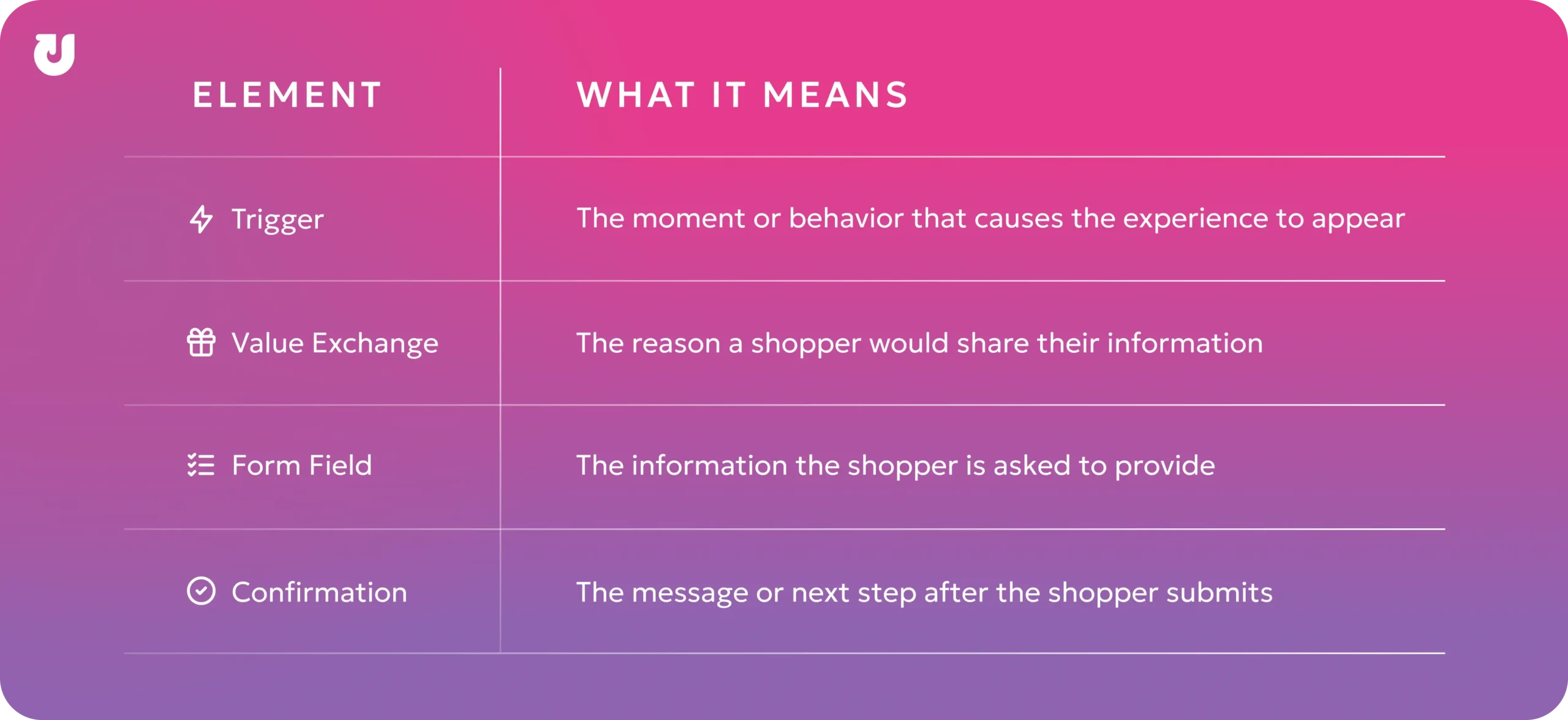
The best lead capture experiences usually include four core elements:
Types of Lead Capture Methods
Ecommerce brands can capture shopper information in several ways. The right method depends on what the shopper is doing onsite, what value the brand is offering, and how much interaction the experience requires.
Some common lead capture methods include:
Embedded Forms
Embedded forms are static forms placed directly within a webpage, such as a footer, landing page, blog post, product page, or account page. They are often used for newsletter signups, resource downloads, loyalty enrollment, or other low-pressure opt-ins.
Popups, Modals, and Overlays
Popups, modals, and overlays appear on top of website content and are usually triggered by timing, page activity, or shopper behavior. Because they are more visible than embedded forms, they are often used for offers, announcements, product alerts, or high-priority signup opportunities.
Interactive Lead Capture
Interactive lead capture experiences collect information through quizzes, surveys, product finders, calculators, or guided flows. These methods work well when shoppers need help narrowing down options or when the brand wants to collect preference data alongside contact information.
Product Alert Capture
Product alert capture allows shoppers to sign up for updates about a specific item, size, color, release, or availability status. Examples include back-in-stock alerts, price-drop alerts, launch notifications, and waitlists.
Conversational Capture
Conversational capture collects information through chatbots, live chat, virtual assistants, or guided support experiences. This method is useful when shoppers need help, have questions, or want a more interactive path before sharing their information.
Different methods create different levels of visibility, interaction, and friction. The goal is to choose the method that fits the shopper’s context without making the opt-in feel disruptive.
What Information Should You Capture?
Lead capture works best when brands collect only the information they need to create a useful next step for the shopper. Asking shoppers to provide too much information too early can create friction and reduce form completion rates.
For many ecommerce brands, the best starting point is one primary contact field, such as an email address or phone number. This keeps the experience simple and makes it easier for shoppers to complete the form.
Common types of information collected through ecommerce lead capture include:
Contact Information
Email addresses and phone numbers are the most common lead capture fields because they allow the brand to identify and reach the shopper after the onsite session.
Basic Identity Information
First name, last name, or birthday can help brands recognize the shopper and support future account, loyalty, or customer profile experiences. These fields should only be requested when they add clear value or are necessary for the experience.
Product Preferences
Preferences like size, fit, color, flavor, price range, product category, or preferred style can help brands understand what the shopper is interested in.
Communication Preferences
Shoppers may be asked which types of updates they want to receive, how often they want to hear from the brand, or which channel they prefer. This can help make the opt-in feel more transparent and shopper-controlled.
Shopping Intent
Intent-based fields can help brands understand whether someone is casually browsing, actively researching, shopping for a specific occasion, waiting for availability, or preparing to purchase soon.
The goal is not to collect as much information as possible. It is to collect the right amount of information for the experience. Start with the minimum information needed to complete the lead capture goal, then collect additional details later only when they add value for the shopper.
How to Create an Effective Lead Capture Strategy
Effective lead capture strategies are built around a simple question: what makes a shopper willing to share their information in this moment?
To answer that, brands need to make six connected decisions: who to ask, when to ask, where to ask, how the experience should appear, what to offer, and how to make the form easy to complete. Each decision should help the experience feel relevant, useful, and low-friction.
Step 1: Identify Shopper Intent
Building a lead capture strategy starts with understanding what shoppers are trying to do on the site. Intent helps determine whether the experience should be broad, product-specific, educational, account-related, or purchase-adjacent.
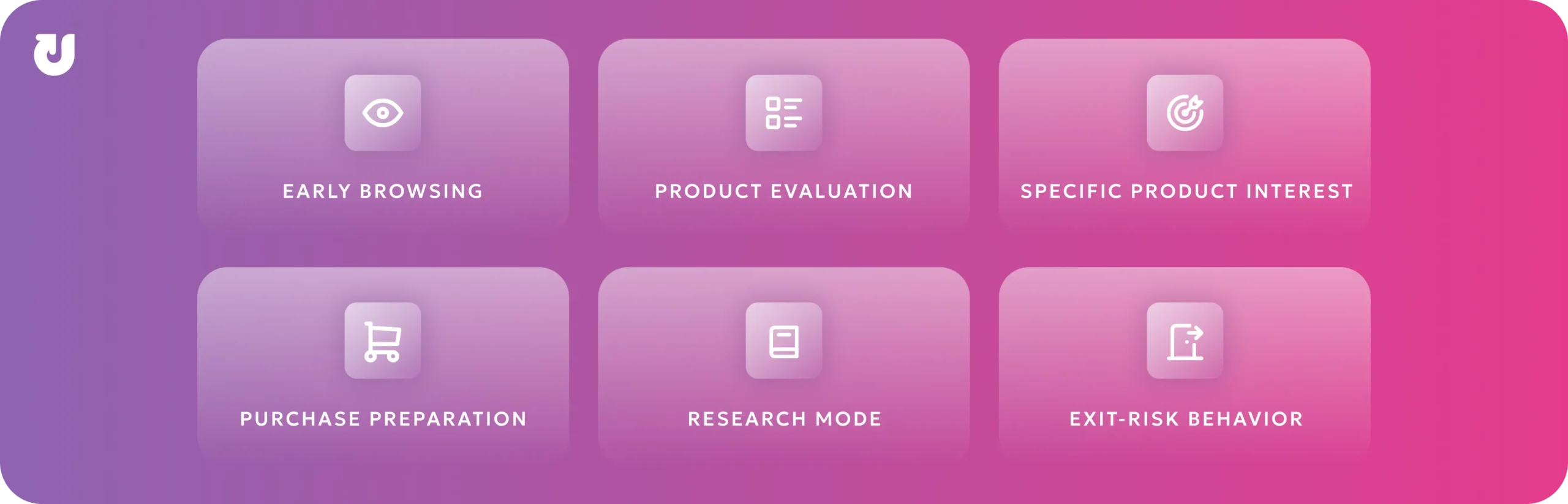
Some common intent signals include:
Early Browsing: The shopper is viewing the homepage, landing page, or multiple categories and may still be learning about the brand.
Product Evaluation: The shopper is viewing product pages, reviews, sizing information, or comparison content and may be narrowing down options.
Specific Product Interest: The shopper is checking availability, selecting variants, or returning to the same item and may care about a specific product, size, color, or update.
Purchase Preparation: The shopper is adding items to cart, starting checkout, or creating an account and may need a simple, non-disruptive capture experience.
Research Mode: The shopper is reading blog posts, buying guides, FAQs, or educational content and may need more information before deciding what to do next.
Exit-Risk Behavior: The shopper shows signs they may leave before taking action, such as inactivity, rapid tab switching, moving toward the browser close button, or backing away from the current path. This can be a useful moment for a final, low-friction lead capture opportunity.
Step 2: Match Timing to Shopper Intent
Once shopper intent is understood, the next step is deciding when the lead capture experience should appear.
Timing plays a major role in how shoppers perceive the experience. A message shown too early can feel intrusive rather than helpful, while a message shown too late could miss the opportunity entirely.
Most lead capture experiences are triggered to launch based on shopper behavior, engagement, or timing conditions. These triggers help brands decide when to introduce an experience based on how shoppers are interacting with the site.
Entry-Based Triggers (Low Intent)
Appear shortly after a shopper arrives on-site. They offer high visibility, but can feel disruptive if shoppers have not had enough time to engage with the website yet.
Engagement-Based Triggers (Mid Intent)
Appears after a shopper scrolls, views content, filters products, or interacts with the page. This timing often feels more relevant because the shopper has already shown interest.
Product-Based Triggers (Mid Intent):
Appears when a shopper engages with a specific item, variant, size, color, or availability status. This works best when the opt-in is directly tied to that product context.
Exit-Intent Triggers (High Intent)
Appears when behavior suggests the shopper may leave before taking action. This can be useful for presenting a final, low-friction capture opportunity, but it should stay focused on collecting contact information rather than becoming a full abandonment strategy.
Repeat-Visit Triggers (High Intent)
Appears when shoppers return after previous browsing activity. Repeat visits often signal ongoing interest, making them a strong opportunity for personalized engagement or follow-up messaging.
The key to a successful lead capture strategy is to engage shoppers when they are most receptive.
Step 3: Align Placement With the Shopper Journey
Where lead capture appears on a website can influence how relevant the experience feels.
A shopper’s mindset changes depending on where they are in the purchase journey, so lead capture placement should reflect the page they’re viewing instead of using the same experience everywhere on the site.
|
Page Type |
Best Lead Capture Role |
|
Homepage and landing pages |
Introduce a broad opt-in opportunity for new or early-stage visitors |
|
Category and collection pages |
Collect shopper interests, preferences, or product needs |
|
Product pages |
Capture product-specific interest, such as size, color, availability, or guide interest |
|
Cart and checkout pages |
Collect information in a way that supports the purchase path without distracting from it |
|
Blog posts and buying guides |
Extend the value of educational content for shoppers who are still researching |
|
Account, loyalty, and referral pages |
Support account creation, rewards enrollment, referrals, or early access |
Because cart and checkout pages are conversion-sensitive, lead capture should support the shopper’s current action rather than pull attention away from the purchase path.
Step 4: Choose the Right Lead Capture Format
The format determines how the lead capture experience appears to the shopper.
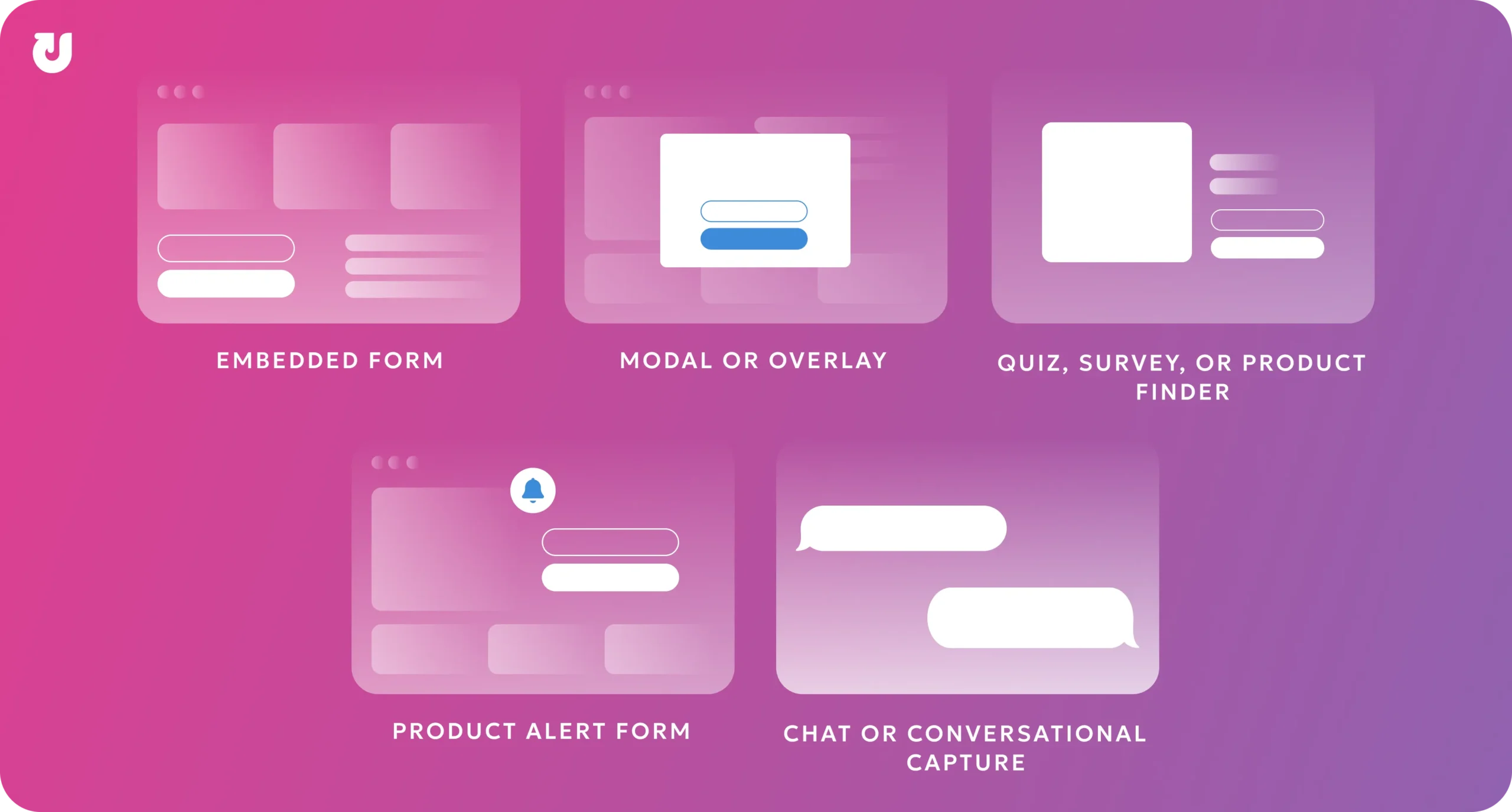
A simple way to choose the right format is to match it to the role the experience needs to play:
|
If the goal is to... |
Use this format |
|
Keep the experience subtle |
Embedded form |
|
Capture attention quickly |
Modal or overlay |
|
Collect preferences |
Quiz, survey, or product finder |
|
Support a specific product interest |
Product alert form |
|
Help shoppers through questions |
Chat or conversational capture |
The right format depends on how much attention the experience needs, how much information the shopper is being asked to provide, and whether the value exchange is strong enough to justify the interruption.
Step 5: Define the Value Exchange
Visitors are more likely to share their information when they feel like they are receiving something valuable in return.
A value exchange is the benefit a shopper gets for sharing information like an email address, phone number, or preference. The right value exchange depends on what the shopper wants in that moment, how much information the form asks for, and how much effort it takes to complete.
Common lead capture value exchanges include:
- Incentives and offers: Discounts, free shipping, free gifts, or other savings-based benefits that give shoppers an immediate reason to opt in.
- Product updates: Availability alerts, launch notifications, price changes, or other updates tied to an item the shopper has already shown interest in.
- Helpful guidance: Guides, quiz results, comparison resources, calculators, or other tools that help shoppers make a more confident decision.
- Access and membership: Early access, loyalty benefits, referral rewards, VIP perks, or member-only experiences that make the opt-in feel connected to a deeper brand relationship.
A strong value exchange should be:
- Relevant: It connects to what the shopper is already doing or considering.
- Clear: The shopper immediately understands what they will receive.
- Proportional: The benefit feels fair based on how much information the form asks for.
- Timely: The offer appears when the shopper is most likely to care about it.
A weak value exchange feels vague or one-sided. For example, asking shoppers to “sign up for updates” may not be enough if they do not understand what kind of updates they will receive or why those updates are useful.
A stronger value exchange leads with the benefit before asking for information. Instead of making the form the focus, the experience should make the shopper’s reason to opt in clear first.
Step 6: Reduce Form Friction
Once the value exchange is clear, the form should be as easy as possible to complete. Even a strong offer can underperform if the form feels confusing, time-consuming, or difficult to use.
A strong lead capture form should make three things immediately clear:
- What the shopper will receive
- What information they need to provide
- What happens after they submit
To reduce friction, keep the experience simple and focused. Use clear form labels, limit required fields, make the CTA specific, and design the layout so it is easy to complete on both desktop and mobile.
The CTA should reinforce the value exchange instead of using generic language. For example, “Get My Guide,” “Notify Me,” or “Send My Discount” usually feels more specific than “Submit.”
After the shopper submits, use a confirmation message to explain what happens next. This helps reassure them that the form worked and sets clear expectations for the next step.
Real Examples of Ecommerce Lead Capture Strategies
Now that we’ve covered the framework behind effective lead capture, let’s look at how ecommerce brands apply these strategies in real-world customer journeys.
The examples below show how brands use onsite lead capture experiences to collect contact information, create a clear value exchange, and turn anonymous shoppers into reachable contacts.
Each example highlights how the experience worked, why shoppers had a reason to opt in, and the measurable lead collection result.
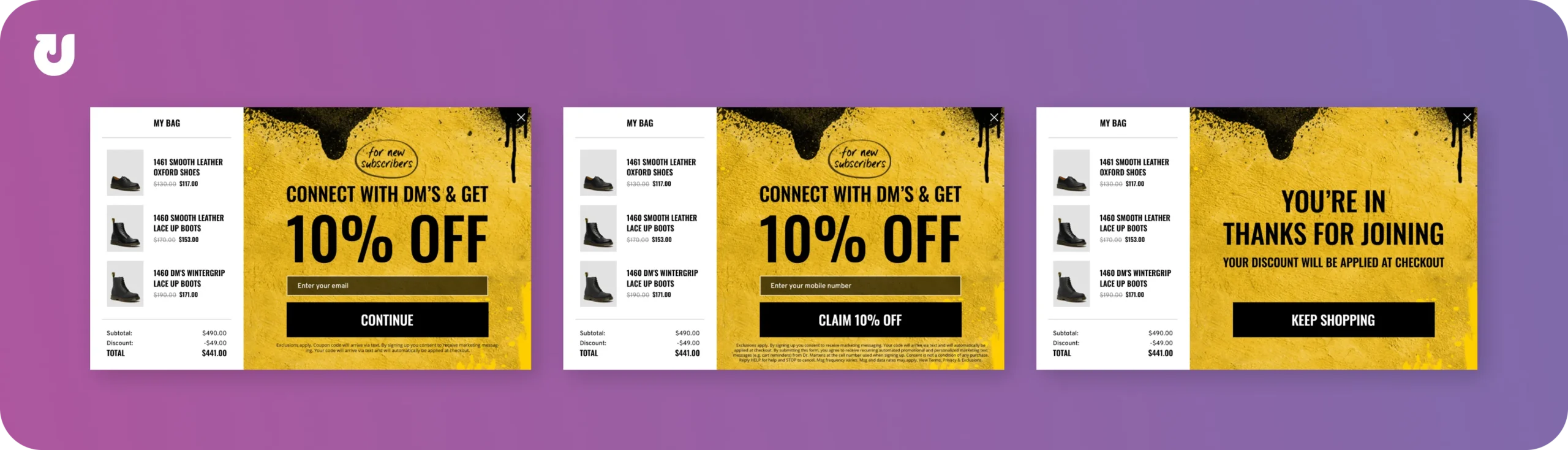
Offering a Discount for High-Intent Shoppers
When shoppers showed signs they were about to leave the site, an overlay offered a 10% discount in exchange for their email address. The lead capture experience dynamically displayed the shopper’s cart total, the discount amount, and the updated order total.
After submitting their email, shoppers were also asked to provide their mobile phone number. Once both were submitted, a confirmation message let them know their discount would be automatically applied at checkout.
Showing the discount calculation in real time helped reinforce the value of the offer at a key moment to keep shoppers engaged.
Result: The campaign achieved a 16% lead collection rate.
(Source: Shoe Case Study)
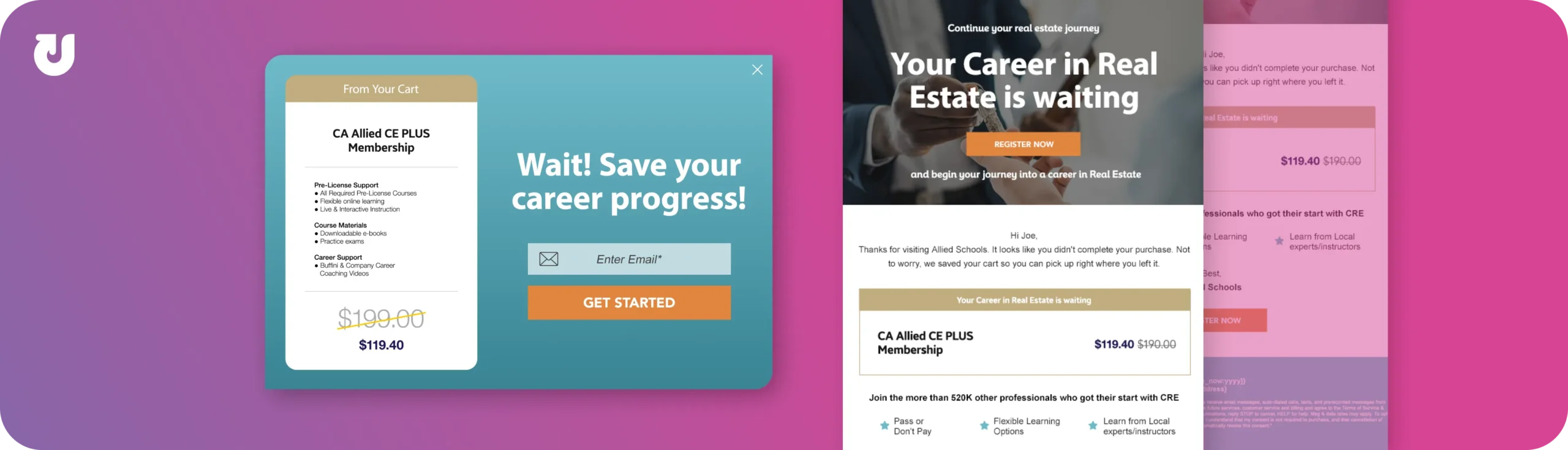
Recovering Abandoning Shoppers with Saved Carts
When shoppers attempted to abandon the site with items still in their cart, an overlay gave them the option to save their cart by entering their email address. After submitting the form, shoppers received a confirmation message letting them know their saved cart would be emailed to them shortly.
Follow-up emails included a personalized link that restored the shopper’s cart with any existing discounts already applied. Making it easy for shoppers to return directly to their saved cart helped reduce friction and simplified the path back to checkout.
Result: The campaign achieved a 12% lead collection rate.
(Source: Online Learning Case Study)
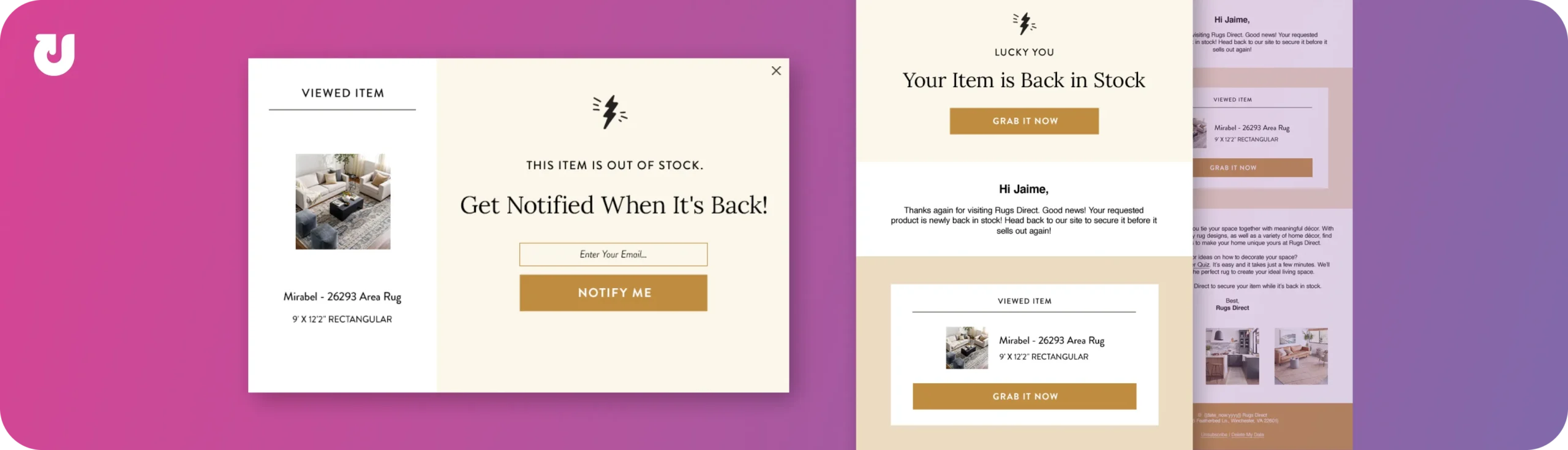
Capturing Product Interest with Back-in-Stock Notifications
When shoppers viewed items that were out of stock, an overlay gave them the option to sign up for back-in-stock notifications by entering their email address. After submitting their information, shoppers received a confirmation message explaining that a follow-up email would be sent to them shortly.
One inventory became available again, shoppers received remarketing emails notifying them the product was back in stock. If the item was not restocked after 14 days, shoppers were enrolled in an email series that surfaced similar popular items instead.
Result: The campaign achieved a 59% lead collection rate.
(Source: Remarketing Experience Case Study)
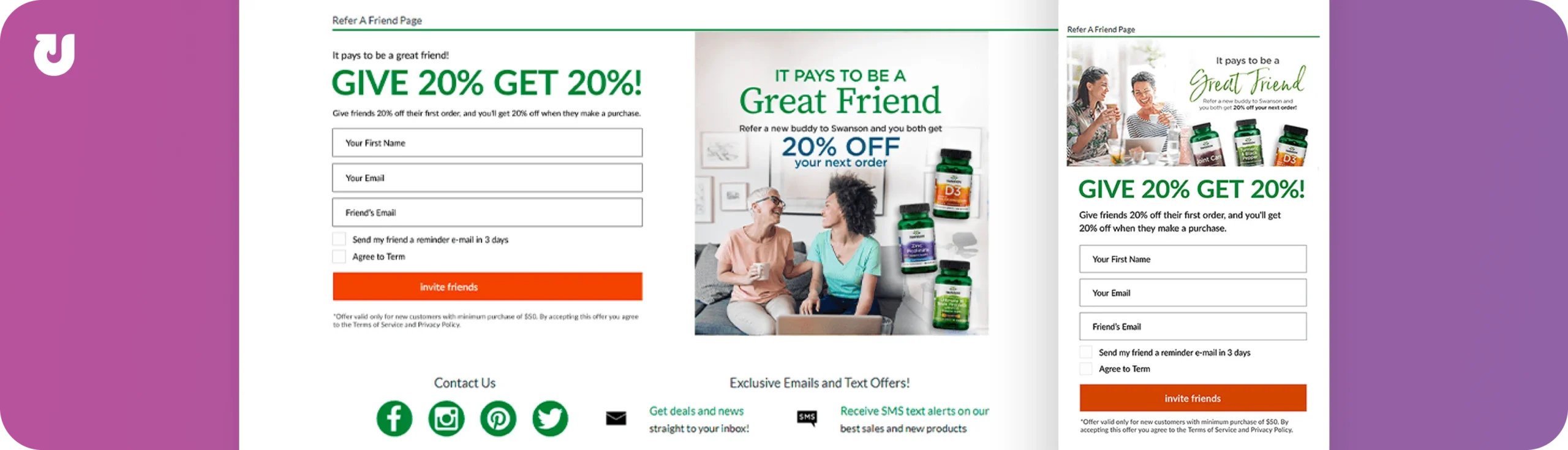
Driving Referrals Through Shared Discounts
When shoppers visited the Refer-a-Friend page, an embedded in-page email capture experience encouraged them to enter their first name, email address, and their friend’s email address in exchange for 20% off for both parties. After the shopper submitted the required form fields, a confirmation message let them know their friend would receive the discount offer shortly.
The referrer also had the option to send a reminder email three days later if the offer had not yet been redeemed. Giving both parties a reason to participate helped make the experience feel more worthwhile and encouraged continued engagement with the offer.
Result: The campaign resulted in a 22% lead collection rate.
(Source: Supplements and Nutrition Case Study)
Additional Resources
If you want to learn more about lead capture strategies, the resources below explore many of the concepts and examples covered throughout this guide in greater detail.
- 8 Lead Capture Tactics for Ecommerce (Matched to Shopper Intent)
- Email Signup Forms Best Practices for Increased Conversions
- New-to-File Leads Case Study
- Cart Preserver Case Study
- Lead Capture Solution Guide
- Remarketing Experience Case Study
Frequently Asked Questions about Ecommerce Lead Capture
What Is Lead Capture?
Lead capture is the process of collecting contact information from website visitors so you can follow up with them later. In ecommerce, this usually happens when a visitor shows interest but isn’t ready to buy, and instead shares their email or phone number in exchange for something like a discount or product updates.
What Is A Lead Capture Form?
A lead capture form is the part of a website where a visitor enters their information, such as their email address or phone number. These forms can appear in different formats, like embedded fields on a page or on-site overlays, and are used to turn anonymous visitors into identifiable contacts.
What Is The Purpose Of A Lead Capture Form?
The purpose of a lead capture form is to convert website visitors into contacts that a brand can re-engage later. Instead of losing visitors who leave without buying, the form gives you a way to continue the conversation through email or SMS.
What Is The Difference Between Lead Generation And Lead Capture?
Lead generation brings people to your website, often through channels like ads, search, or social media. Lead capture happens once they arrive, and focuses on collecting their contact information so you can follow up. In short, lead generation drives traffic, while lead capture turns that traffic into contacts.
What Is The Difference Between Email Capture And Lead Capture?
Email capture is a type of lead capture that focuses specifically on collecting email addresses. Lead capture is a broader term that includes collecting any information a visitor voluntarily shares, such as an email address, phone number, name, preferences, or other first-party data.
How Does Lead Capture Work?
Lead capture works by presenting visitors with an opportunity to share their information while they’re on your site. This usually involves offering something in return, such as a discount, personalized recommendations, or exclusive updates, then asking for contact details through a form. The goal is to capture interest before the visitor leaves.
When Should Lead Capture Forms Appear On A Website?
Lead capture should appear when a visitor has had time to engage with the site, not immediately when they arrive. This often means showing the engagement after someone has spent time on a page, viewed products, or is about to leave the site. Timing the lead capture engagement around shopper behavior rather than immediately on page load usually leads to better results.
What Are The Best Lead Capture Strategies?
The most effective lead capture strategies combine clear value, strong timing, and a simple shopper experience. Common approaches include offering a discount or incentive, using behavior-based triggers, personalizing messages, and following up quickly after capture.
What Information Should I Ask For In A Lead Capture Form?
In a lead capture form, start by asking for an email address so you can follow up with remarketing emails. Additional fields like phone number, name, or preferences can be useful, but should only be added if they improve the experience or help create more relevant follow-up messaging.
How Many Fields Should A Lead Capture Form Have?
Most lead capture forms perform best with a small number of fields, typically between one and five. Fewer fields usually increase completion rates, while more fields can help qualify leads. The right balance depends on what your brand needs and how much value you’re offering to shoppers in return.
What Should Happen After Someone Submits A Lead Capture Form?
After someone submits a lead capture form, they should promptly receive a confirmation message that clearly explains what happens next. This can include confirming a discount, delivering a resource, or setting expectations for future communications.
How Can Lead Capture Support First-Party Data Collection?
Lead capture supports first-party data collection by giving shoppers a way to voluntarily share information directly with a brand. This type of information can include contact details, product preferences, interests, communication preferences, and other data that helps personalize future experiences in a compliant and trustworthy way.
What Is A Good Lead Capture Rate?
A typical lead capture rate falls between 2% and 5%, though this can vary based on industry, traffic quality, offer type, and user experience. Higher-performing experiences can exceed that range, especially when targeting engaged visitors or using strong incentives.
How Do You Calculate Lead Collection Rate?
You can calculate lead collection rate using this formula:
Lead Collection Rate = Leads Captured ÷ Visitors Who Saw the Experience × 100
This measures the percentage of visitors who submitted their information after seeing a lead capture experience.
How Do I Increase Lead Capture Rate?
To increase your lead capture rate, focus on making the offer clear, reducing friction in the form, and improving timing. Showing the right message at the right moment, simplifying the experience, and conducting A/B testing can all have a meaningful impact on performance.
Do Discounts Improve Lead Capture Rates?
Discounts can improve lead capture rates because they give visitors an immediate reason to share their information. They are most effective when shown at key decision points, such as when a shopper is about to abandon the site or hesitating during checkout.
What Tools Can I Use To Capture Leads On My Website?
Lead capture is typically implemented using on-site technologies that launch signup experiences, collect information, and trigger follow-up actions. This can include form builders, email and SMS platforms, and behavioral engagement tools that respond to visitor activity in real time.
When Should I Work With A Conversion Rate Optimization (CRO) Partner?
You should consider working with a CRO partner if you have steady traffic but low lead capture performance, or if you’ve already tried basic optimizations without seeing meaningful improvement. A partner can help identify missed opportunities, test new strategies, and improve results over time.